deploy/labs/ — the demo
The demo is your machine
One file to fetch, one command to run: GoVueKit starts with every service it talks to — OIDC sign-in, S3 uploads, Stripe checkout, outgoing email — behind one local proxy. No repository, no account, no value to configure.
The stack runs the image every release publishes and signs. Its source — including this labs — is what the licence buys.
Port 80 is the only one taken on the host: *.localhost already resolves to your machine, so there is no domain, no certificate and no /etc/hosts to touch.
$ curl -fsSLO https://govuekit.dev/labs/docker-compose.yml
$ docker compose up -d
- proxytraefik v3:80
- dbpostgres 17internal
- dexOIDC issuerauth.labs.localhost
- mailpitSMTP + inboxmail.labs.localhost
- minioS3 storages3.labs.localhost
- stripe-mockbilling APIfixtures
- appgovuekitlabs.localhost
→ open http://labs.localhost no account · nothing to configure
the walk
Walk a real flow, end to end
- 01
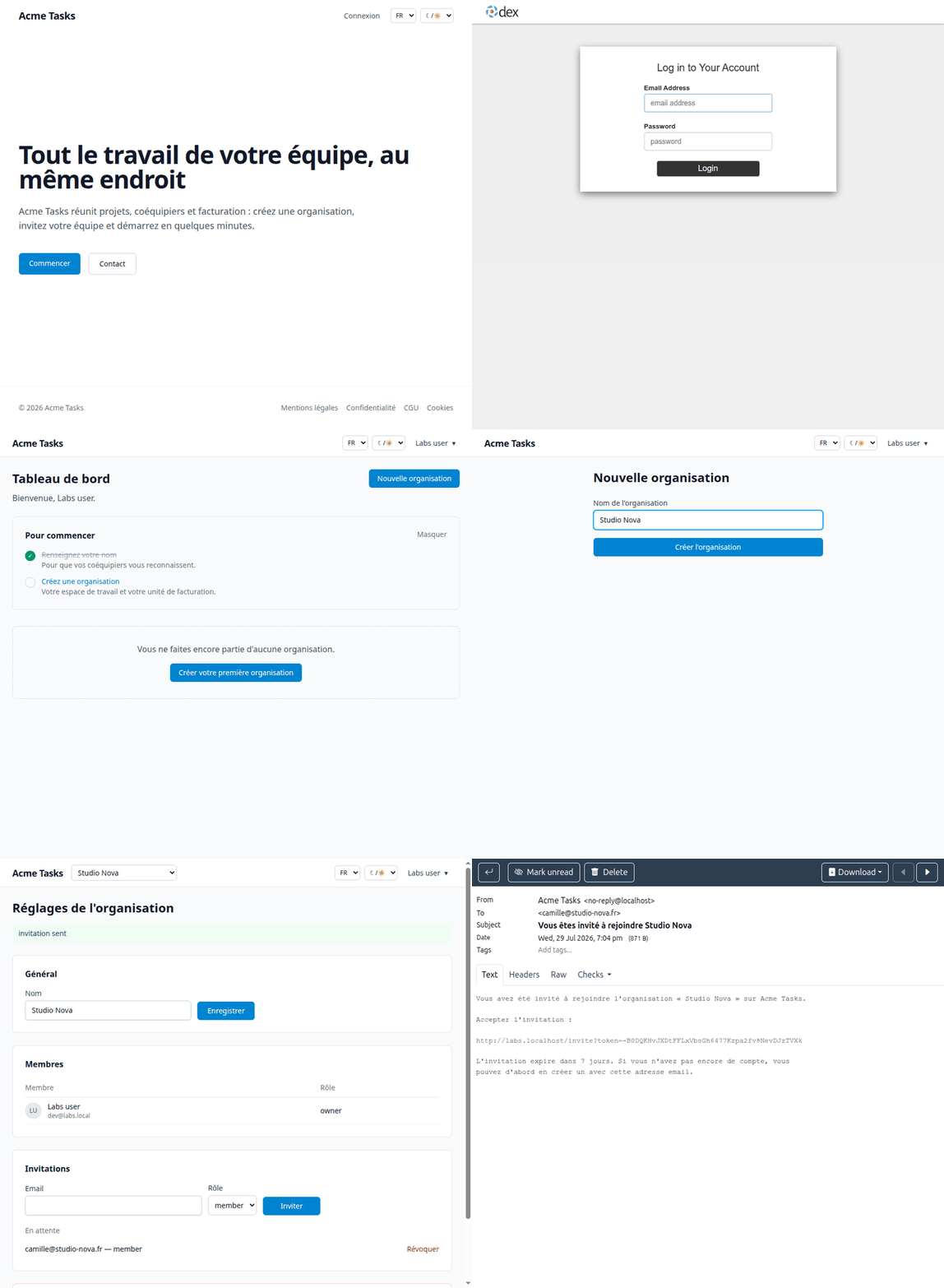
Sign in through Dex with dev@labs.local / labs — the same OIDC path a corporate IdP takes in production.
- 02
Invite a teammate to your organization and open the invitation email in Mailpit.
- 03
Upload an avatar and find the object in the MinIO console.
- 04
Walk the checkout: stripe-mock answers the billing calls with fixtures, no Stripe account needed.
Nothing leaves your machine
Every credential is a constant in the compose file: the stack is disposable by design, and one command wipes it as if it never existed.
$ docker compose down -v
one honest limit
stripe-mock answers the API but emits no webhook — and webhooks are the part worth rehearsing. Put real Stripe test keys in a .env next to the compose file and the webhook path runs too.
Read the labs guide →Stop rebuilding the same foundation.
Accounts, teams, billing, emails, admin, security: the weeks that pass before you write the first line of your actual product. They are already written, tested and documented.